 online help
Sending
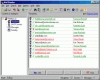
This panel displays the list of all-active threads with current states.
� Use Mail-Start Sending item of the main menu or Start button on Speed Bar to start the process of sending.
� Use Mail-Abort Sending item of the main menu or Stop button on Speed Bar to abort the process of sending.
� Use Mail-Reset Attributes item of the main menu or Attributes button on Speed Bar to reset the attributes of sending.
� Press Delete button on the keyboard to reset selected thread.
See also:
� About the program
� Purpose of the program
� How to send messages
� How to work with BML
files
� User interface
� How to register
|
|
Send personalized email utilizing mailing lists! | |
 Back
to Mail Bomber online help
Back
to Mail Bomber online help